A lot of modern technology contains capacitors! These are
like energy buckets, little batteries that fill up when you put a
current through them, and discharge otherwise. 10 seconds is the time it takes most capacitors to discharge enough for the electronics they’re powering to stop working.
That’s why when you turn your PC off at the wall, things like an LED on
your motherboard take a few seconds to disappear. You probably could
wait a different time, but 10 seconds is the shortest time you can be
sure everything’s discharged.
Why fully powering down the device matters hinges on how data is
temporarily stored in it. A typical modem or router has two types of
memory: Non-volatile Memory (NVRAM) and regular old Random Access Memory
(RAM) like the kind in your computer. The router boots off the code
stored in the NVRAM and then uses the RAM just like your computer would
to write temporary variables, execute code, etc. By fully powering down
the device and letting the electrical charges dissipate, the RAM is
wiped and, upon rebooting the device, the micro operating system in the
device has clear RAM to use.
Ever thought if you could play/pause the video being played on your system by just raising your hand ? If yes, then this is possible with Flutter. Flutter is an application for both Mac And Windows that allows you to control your Windows Music Player, Winamp, iTunes or Spotify through hand gestures. The technique takes benefit of your webcam to sense your hand.
What You Require To Use Flutter :
A PC with Windows or Macintosh installed.
A webcam, either external or the Laptop’s internal webcam.
A supported media player from Windows Media Player, iTunes, Spotify or Winamp
Technique Behind Flutter :
A webcam attached to your system monitors you all the time when the Flutter app is running. The Flutter app always waits for a signal from your webcam that shows an open hand, more precisely a signal we use for stop. Whenever it notices your hand up in the air it sends a signal to the CPU to start/stop the play. See the below image to see what exactly happens.
How To Use Flutter :
Just install the Flutter app from their official site.
Run the app and start an audio or a video file in any one of the four supported media player.
Make sure your webcam is working properly and just raise your hand in front of your webcam.
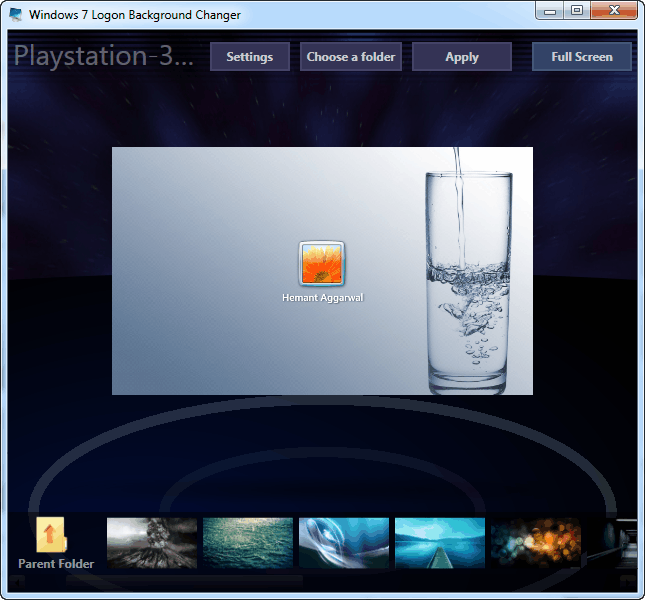
Changing Windows 7 logon screen (Welcome screen) manually is not an easy task. To make it easy we have a software called “Windows 7 Logon Background Changer” which seamlessly does this for you. The application is open source and lets you specify any folder from which you want to set the background. It displays the exact look which you will have after you apply the background.
Nowadays we have only one button on our PCs and Laptops for starting or shutting down the PC. But on earlier Windows machines we used to have two buttons, one for the Shut Down and the other for Restart. This Restart button never closed any open application and thus was very fast. But in today’s systems if we Restart the computer with the Restart option, then it first closes all the open applications and then shuts down the computer, thus making it slow.
What’s The Problem And The Use ?
The button went missing but the feature is still there. Don’t know why Microsoft is hiding it. It is specially for those situations when an application is preventing Shutdown or you have saved all your work and need to restart your PC faster without Windows wasting time on closing applications. It is also helpful when a new software upon installation wants your system to be restarted.
How To Restart Windows PC Faster
Press the Ctrl + Alt + Delete key combination.
On the next screen hold the Ctrl key and press the Shutdown button on the bottom-right corner.
Now Windows will show a warning that it will immediately restart the computer and any unsaved data will be lost. Press OK.
That’s it. Now your system will Restart faster than ever.
VERDICT
The emergency restart is quite powerful and should be used with caution. It is advised to double check if any of your open file has unsaved data, this is because the emergency restart will never give you any warning for your unsaved files.